
How to Receive Money from Remitly Philippines (GCash, Bank, Cash Pickup)
Learn how to receive money from Remitly in the Philippines using bank deposit, GCash or cash pickup. Step-by-step guide and delivery times explained.



If you have an account with Chinabank, but prefer to use GCash to make day to day payments conveniently, you might be looking for options on how to transfer money from Chinabank to GCash most easily.
This guide walks through the payment types available, and the Chinabank to GCash transfer fee in each case. We’ll also touch on what to do if a Chinabank to GCash transfer is not received, in case you run into any problems. We'll also introduce the Wise account, a handy companion to make your money go further with low, transparent fees.
| Table of contents |
|---|
Sign up for a free account now
Yes. You can transfer money from Chinabank to GCash online, and using the Chinabank mobile network. Your payment can be processed through either Instapay or PESOnet.
If you’re not sure which payment method is best for your transfer, it helps to know about the differences - here’s a quick summary¹:
| Feature | Instapay | PESOnet |
|---|---|---|
| Maximum number of daily transactions | No limit | No limit |
| Maximum daily payment limit | 10,000 PHP/day, rising to 50,000 PHP a day after 2 weeks of usage Limit set by GCash | 100,000 PHP per transaction limit, and 250,000 PHP daily limit Limit set by Chinabank² |
| Monthly limit | Depends on whether your account is verified | Depends on whether your account is verified |
| Fee | 10 - 15 PHP | 20 PHP |
| Delivery time | Instant | Same day for payments made before 4:00pm, next day if you miss this cut off |
*Details correct at the time of writing - 6th August, 2025
To transfer money from Chinabank, you’ll need an eligible account, and you’ll need to make sure your personal and contact details are up to date to use the online and mobile banking network. In particular, make sure your phone number is registered correctly as you need to receive a passcode through your phone to confirm your outgoing payment to GCash.
While you’re getting set up, it’s also worth verifying your GCash account to raise your wallet limit and unlock a whole host of new features³. Verify your account with a government issued ID document and you’re good to go⁴.
The easiest way to move money from your Chinabank account to GCash is to set up a digital payment. Sending the money using the mobile banking network, through Instanet, is also the best way to get the cheapest available fee.
Here’s how to transfer money from Chinabank to GCash using the Chinabank digital banking services:
You can make a transfer from Chinabank to GCash using either Instapay or PESOnet. The Chinabank to GCash transfer fee you pay depends on which one you pick, and how you arrange the transfer. Here’s a summary of the Chinabank to GCash transfer fee options:
| Payment method | Chinabank fee |
|---|---|
| Instapay via Chinabank Mobile | 10 PHP |
| Instapay via Chinabank Online | 15 PHP |
| PESOnet | 20 PHP |
*Details correct at the time of writing - 6th August, 2025
The length of time it takes for your payment to arrive in GCash depends on whether you use Instapay or PESOnet. Instapay transfers can arrive right away, but PESOnet payments are processed in batches at various times of day, and so there may be a wait time of a few hours, or overnight.
If your payment has still not arrived, GCash recommends you check the payment status with Chinabank, and also look on the GCash app to see if any error messages may have arrived. Common reasons for delayed or missing payments include using an incorrect phone number to make the transfer, or making a transfer which exceeds your wallet allowable balance⁵.
If you need more help, you can open an in app chat with GCash to ask for advice, or call the GCash hotline:
- For Globe and TM Mobile Subscribers: 2882 (toll-free)
- For Globe Landline Users: (02) 7213-9999 (toll-free)
You can also call the Chinabank contact center on (+632) 888-55-888 if you need help from that end.
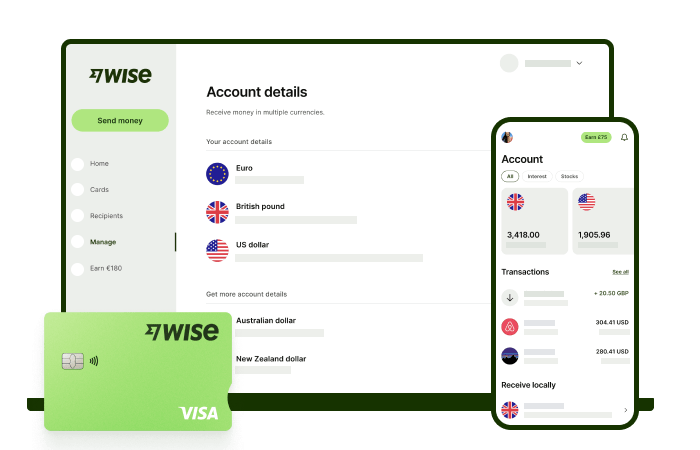
Receive foreign currency and exchange it directly to pesos at the mid-market rate with Wise.
With Wise, you'll get 8+ local account details including PHP, USD, GBP, AUD, and more. This way, you can receive money directly, in a cheap and convenient manner. All you need to get started is to sign up for a free account, and you'll be able to manage your money with just a few taps of your phone.
After getting your money, you can easily convert it to 40+ currencies, with low fees, and the mid-market rate - also known as the rate you see on Google. This includes exchanging to PHP with a one-time conversion fee from 0.57% that's shown upfront, and no markups or additional fees.
Receive, exchange, and move your funds to your local bank account in PHP in a cheap and convenient manner with Wise.
It’s simple and stress free - and lets you keep on top of your finances no matter what you’re up to.
*Please see terms of use and product availability for your region or visit Wise fees and pricing for the most up to date pricing and fee information.
This publication is provided for general information purposes and does not constitute legal, tax or other professional advice from Wise Payments Limited or its subsidiaries and its affiliates, and it is not intended as a substitute for obtaining advice from a financial advisor or any other professional.
We make no representations, warranties or guarantees, whether expressed or implied, that the content in the publication is accurate, complete or up to date.

Learn how to receive money from Remitly in the Philippines using bank deposit, GCash or cash pickup. Step-by-step guide and delivery times explained.

Compare the best international money transfer apps in the Philippines. See fees, exchange rates, speed and payout options to find the right app for you.

Wondering how to pay for your Atome bill using GCash? Learn more about how to make payments for your Atome card and more.

Need to send money from Paypal to GoTyme? Our 2025 guide covers the step-by-step online transfer process, fees, and processing times.
Learn how to transfer money from GCash to Wise with our detailed guide. We cover fees, processing times, verification steps, and account requirements.

Sending money from Japan to the Philippines? Learn how to transfer from SBI Remit to GCash with our guide, covering fees, exchange rates, and transfer times.











