
Best HMO and Health Insurance for Freelancers in the Philippines
Compare the best HMO and health insurance plans for freelancers. Explore prepaid health cards, HMOs, medical insurance and critical illness cover.





When you register your business in the Philippines - or if you’re registering as a sole proprietor, or mixed income earner, for example - you’ll be issued with a BIR Certificate of Registration (Form 2303). Your BIR certificate of registration includes essential information like your Taxpayer Identification Number (TIN), which is required to legally trade in the Philippines.
This guide looks at how to get a certificate of registration in person, and how to get a BIR certificate of registration online through ORUS or NewBizReg. We'll also introduce the Wise account, a handy companion to make your money go further with low, transparent fees.
| Table of Contents |
|---|
Sign up for a free account now
The BIR certificate of registration - is your official certificate from the Bureau of Internal Revenue to show you’re registered properly for tax¹.
You might also see the acronym COR, meaning BIR Certificate of Registration - this is simply an abbreviation, but it means the same thing.
Your Certificate of Registration is issued when you apply for a TIN - this is needed so you can issue receipts for business transactions and pay your taxes legally in the Philippines.
We’ll cover the BIR certificate of registration requirements for different registration types in a moment.
Form BIR 2302 is no longer used by BIR under normal circumstances. This has been replaced with Form 2303. If you’re looking for your Certificate of Registration, 2303 is the right form for you.
You’ll always need an ID document and a completed registration form, and you may also need to provide some extra documents depending on your business type and personal situation. Commonly required documents include:
You can get a certificate of registration (BIR Form 2303) in person at the Revenue District Office (RDO) closest to your home or place of work. Or you can apply digitally - either using the BIR Online Registration and Update System (ORUS) or NewBizReg portal².
Whichever option you choose, the process is quite similar - here’s how to get a certificate of registration (BIR Form 2303):
Yes. Apply for a BIR certificate of registration online either using the BIR ORUS platform or the NewBizReg portal. You’ll need to upload images of the required documents and also a selfie to show you’re using your own ID.
You can find BIR certificate or registration samples online with a Google search. The document contains key information about you and your business, including your personal details, your TIN, your registered tax office and details of your type of work and the tax you pay.
Once you’ve registered with the BIR, you’re officially set up to work as a freelancer or run your business legally in the Philippines.
If you work with international clients, you’ll likely need a way to receive payments from abroad, manage different currencies, and convert your earnings back to PHP when needed.
Using a multi-currency account like Wise can make this simpler. It lets you receive payments in major currencies like USD, EUR and GBP using local account details, so clients can pay you like a local. You can then hold your balance in foreign currencies or convert to PHP when it suits you.
This can be especially helpful if you want more control over exchange rates and avoid unnecessary conversion costs when getting paid from overseas.
If you’re looking for a more streamlined way to manage international payments, here’s one option to consider:
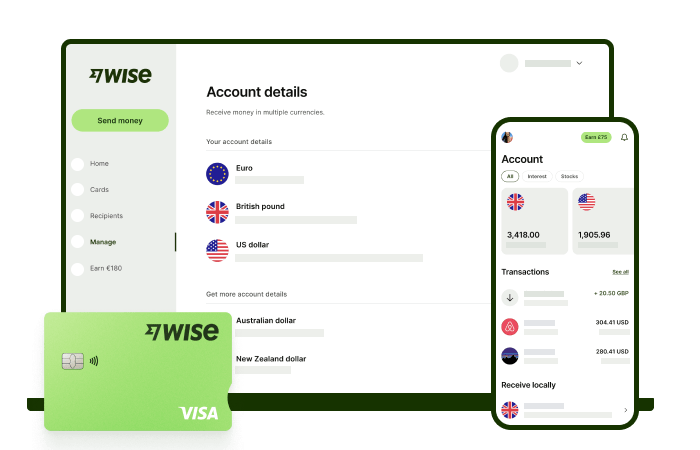
Did you know that over 76%* of Filipinos cite low and transparent fees as an important factor when receiving money from abroad? With Wise, that's exactly what you're getting - all you need to get started is to sign up for a free Wise account, and you'll be able to manage your money with just a few taps of your phone.
You'll have access to 8+ local account details for major currencies including PHP, USD, GBP, AUD, and more, allowing you to receive money directly, in a cheap and convenient manner. After getting your money, you can easily convert it to 40+ currencies, with low fees, and the mid-market rate - also known as the rate you see on Google. This includes exchanging to PHP with a one-time conversion fee from 0.57% that's shown upfront, and no markups or additional fees.
Get paid and move your funds to your local bank account in PHP in a cheap and convenient manner with Wise to stretch every peso.
*Disclaimer: The percentage figure mentioned above is based on an internal survey conducted by Wise in April, 2024
✍️ Sign up for a free account now
*Please see terms of use and product availability for your region or visit Wise fees and pricing for the most up to date pricing and fee information.
This publication is provided for general information purposes and does not constitute legal, tax or other professional advice from Wise Payments Limited or its subsidiaries and its affiliates, and it is not intended as a substitute for obtaining advice from a financial advisor or any other professional.
We make no representations, warranties or guarantees, whether expressed or implied, that the content in the publication is accurate, complete or up to date.

Compare the best HMO and health insurance plans for freelancers. Explore prepaid health cards, HMOs, medical insurance and critical illness cover.

Are you a Filipino freelancer? Learn how to get your own US/Euro account details. Receive USD, convert to PHP at the real rate, and save on fees

Searching for the best laptop for a virtual assistants? Our guide covers top specs, brands, and budget options to boost your WFH productivity.

Ready for a non-voice WFH job? This guide covers roles (with salaries!), essential skills, where to find legitimate postings, and how to get paid.

Explore the types of virtual assistant work. Find your niche, from social media to data entry, and learn how to manage client payments easily.

Your guide to landing direct client virtual assistant jobs from the Philippines. Learn where to find clients, build your portfolio, and get paid easily.











