
Remitly vs Wise in Singapore: fees, rates and transfer speed
Pricing claim based on comparative data for select airports and passes. Live pricing is subject to exchange rate fluctuations. 📱Find out how to get lounge...




Pricing claim based on comparative data for select airports and passes. Live pricing is subject to exchange rate fluctuations.
📱Find out how to get lounge access
If you’re expecting an overseas payment through Western Union, you might be wondering how the process of receiving your money will work. This guide has you covered with all you need to know about sending and receiving payments, including the costs and practicalities to think about.
We’ll also take a look at an alternative way to receive international payments in Singapore - Wise. With Wise you could save money on fees, and have your payment delivered directly to your bank account for convenience, too.
If you receive a payment with Western Union, you don’t need to pay a fee.
However, the sender will have various costs to consider, which we’ll look at in more detail below. The basic cost of a Western Union transfer depends on the currency and destination country, as well as how the payment is made and received.
To build a picture, we have used the fees the sender would need to think about if sending $1000 USD from the US to Singapore, online.
To compare the costs, we have also added the fees for a similar transfer if you use Wise.
| Service type | Western Union transfer fee² | Wise |
|---|---|---|
| Fee |
| 6.15 USD (through connected bank account³ |
| Exchange rate |
|
|
| Recipient gets | 1231.60 SGD² | 1,270.65 SGD⁴ |
*Exchange rate at the time of the simulation - 12.05.2025, 3.47 GMT+2.
Before you decide to have your cross border payment sent with Western Union, it pays to check out some alternative options. Take a look at Wise for cheap international transfers all over the world.
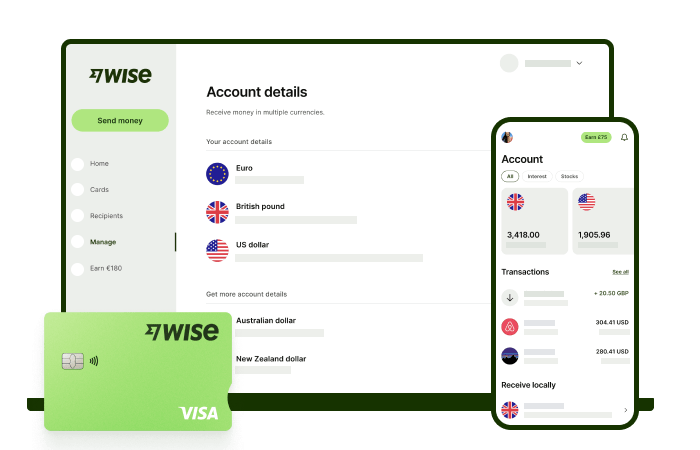
Wise international money transfers can be set up online or within the Wise app with low fees from 0.26% and the mid-market rate, to over 140+ countries. There’s no markup added to the exchange rate that’s used to convert your currency, which makes it easier to see exactly what you're paying for a transfer, and what the recipient will get in the end. Just transfer the amount indicated in SGD and let Wise do the rest.
Track your transfers easily when you create a free Wise account, and manage, hold, and convert your money in SGD and 40+ other currencies. You'll get the same great rates, and be able to track your transfers all from one place. As a bonus, you can also get 8+ local account details to be able to receive money in SGD, USD, GBP, and more.
✍️ Sign up for a free account now
If you choose to receive money with Western Union in cash you’d have to follow the next steps⁵:
If you want for the money to be received in a bank account, you’d have to provider the sender with the following details⁵:
If you are the sender and want to send money through Western Union, you can do it online, using an app, or in person by visiting a Western Union agent. It’s worth noting that the options available to you will depend on the destination country you’re sending to. You can’t necessarily pay by cash at an agent location for all transfers, for example - some have to be set up online. Check the options on the Western Union website for your destination⁶.
Here’s how to send an international payment using the different payment options.¹
To send money online, you’ll need to create an account, or log in if you have an active account already. Model your transfer by adding details of the destination country, and how you want the recipient to receive the money. Then just follow the prompts on screen to pay using a credit or debit card, or by bank transfer.
Before you can get started, you’ll need to download the Western Union app and create and verify your profile. You can verify your profile using video chat, or in-store records if you’ve previously made a Western Union payment. To make a payment, you’ll then follow similar steps to the online process, paying using a credit or debit card, or by bank transfer⁷.
You can pay in person by visiting a Western Union agent location and presenting your government-issued ID or passport. You'll also need to provide your recipient’s details, destination country, and the amount you want to send. Once the transfer details are confirmed, you can pay in cash along with the applicable transfer fee.
If you prefer, you can also start your transfer online and choose Pay in store as the funding method. You’ll then need to visit a participating Western Union agent location to complete the payment in person⁸.
Whichever way you set up your payment, you’ll get a Money Transfer Control Number (MTCN) once the transfer is confirmed, which you’ll need to keep safe.
If you’re making a transfer directly to your recipient’s bank account, you’ll have to give their full bank details. If your recipient will collect the money in cash, you’ll need to give them the Money Transfer Control Number (MTCN) which they will present, along with their own ID, when they go to a Western Union agent to get their money.
There may be limits on the amount of money that can be sent, depending on the sender’s verification status and the rules in their country. For example, unverified users can send up to USD3,000 online or through the app, while verified users can send up to USD50,000 online, via the app, or in person⁹.
You can receive money directly into your bank account, or go to an agent location to collect cash. Here’s how.
Visit a convenient Western Union agent location. Give the details of the payment, including your MTCN and the sender’s name. You’ll then need to show government issued ID to confirm your identity. Once the information has been verified, you’ll be given your payment in cash⁵.
To receive money directly into your bank account, you’ll need to share your bank details with the sender, including your name as shown on your bank records, bank name, account number, and bank code. The sender may also need your address and mobile number, and will be asked to provide the purpose of the remittance when arranging the transfer. Once the payment is sent, the money should arrive in your bank account within a few days, and you can track the transfer using the MTCN⁵.
How long it takes to receive a Western Union payment depends on the transfer method and destination country. Domestic bank transfers are usually completed within the same business day or by the next business day, although some banks may offer real-time or same-day payments for an extra fee. International bank transfers typically take 1–5 business days, depending on factors such as currency conversion, local banking regulations, and intermediary banks. Cash pickup transfers are often much faster and can be available within minutes. Delays may still occur if recipient details are incorrect, banking cut-off times are missed, or additional processing checks are required. You can track your transfer online using the MTCN to check the status of your payment¹⁰.
Sources used in the article:
*Please see terms of use and product availability for your region or visit Wise fees and pricing for the most up to date pricing and fee information.
This publication is provided for general information purposes and does not constitute legal, tax or other professional advice from Wise Payments Limited or its subsidiaries and its affiliates, and it is not intended as a substitute for obtaining advice from a financial advisor or any other professional.
We make no representations, warranties or guarantees, whether expressed or implied, that the content in the publication is accurate, complete or up to date.

Pricing claim based on comparative data for select airports and passes. Live pricing is subject to exchange rate fluctuations. 📱Find out how to get lounge...

Is Panda Remit safe and cheap in Singapore? Compare fees, exchange rates, limits, and see how it stacks up against Wise for international transfers.

Learn everything you need to know about sending an e-ang bao with DBS eGift.

Learn how to send an e-hongbao or digital ang bao to loved ones near and far.
Looking for the best online brokerage in Singapore? Compare platforms like IBKR, Saxo and Moomoo on fees, features and more to find the right account.

Planning a Trust Bank overseas transfer? We reveal if the service is available and compare it to a transparent, fast, and low-cost alternative











