
Can Malaysians Open a BSN Account Online in 2026? Here's All You Need to Know
Can you open a BSN account online in 2026? Learn about minimum deposits, age requirements, and how to complete your application at a BSN branch.



Gone are the days of taking a half-day off work just to wait to open an account.
If you’re wondering whether it’s possible to open an EPF account¹ online in Malaysia without the usual paperwork and delays, the answer is yes.
With the KWSP i-Akaun app using the e-KYC (Electronic Know Your Customer) process, there’s no need to submit physical forms, and you can register your retirement account in a matter of minutes – and all from the comfort of your home.
| Table of Contents |
|---|
The good news? The criteria for EPF eligibility in Malaysia are incredibly broad, covering most people living and working in the country.
Anyone legally working or residing in Malaysia between the ages of 14 and 74 meets the standard EPF eligibility.
These include:
- Malaysian citizens
- Permanent residents of Malaysia
- Non-Malaysian employees with a valid passport and work permits
If you hold a MyKad or MyPR and are starting a new job, you’re pretty much settled. Malaysian citizens and permanent residents are registered automatically the moment the EPF receives the very first contribution from an employer.
Registration uses the name and identification number provided in Form KWSP 6 (Form A), which is then securely verified by the National Registration Department (NRD). Once everything clears, you will receive a notification containing your official EPF number.
However, since 1st October 2025, non-Malaysian employees (except domestic workers) are now required to contribute to the EPF, which we’ll touch on more later.
In any case, if you’re not automatically registered (for example, if you’re self-employed or need to set up your account yourself), you can register directly using the i-Akaun app below:
For Malaysian citizens and permanent residents, the digital registration process is really simple thanks to the KWSP i-Akaun app's e-KYC feature.
Before you begin, prep your physical MyKad or MyPR and find a safe, well-lit room. (Take note: If you do not hold a MyKad or MyPR, you cannot use the app and will need to visit an EPF office to register in person.)
Here’s exactly how to get set up:
- Download the App: Find the official KWSP i-Akaun app on the Apple App Store, Google Play Store, or Huawei AppGallery.
- Start Your Registration: Open the app and tap on the ‘Account registration or activation’ menu. From there, select ‘First time user’.
- Follow the Prompts: The app will guide you through a series of straightforward on-screen instructions. Simply follow along to verify your identity and complete the initial setup.
- Activate Your Profile: Once you are successfully registered as an EPF member, you can immediately proceed to register and activate your i-Akaun (Member) profile.
That’s it. You’ve successfully registered for an EPF account online.
If for whatever reason, you’re unable to use the KWSP i-Akaun app, there are two alternative ways to open your account.
The EPF has self-service kiosks at strategic locations so you can register without queuing at a counter. Do note that this service is available exclusively for MyKad and MyPR holders.
Here’s how to register via an SST:
- Locate an SST: Find your nearest EPF kiosk.
- Verify your identity: Insert your MyKad or MyPR and verify your thumbprint.
- Enter your details: Key in your mobile number and email address.
- Confirm: Review your personal details. Your EPF member number will display on the screen, and you will receive a confirmation email upon successful registration.
If you are unable to register through the app or an SST, you can also visit an EPF office to register in person.
Here is what you need to do:
- Bring your ID: Present your identification documents, such as your MyKad or MyPR.
- Thumbprint verification: Verify your identity using the biometric scanner at the counter.
- Get your number: Once registration is successful, the staff will issue your EPF member number directly.
Take note that if the chip for either can’t be read or if you can’t verify your thumbprint, then you’ll need to complete and submit the form KWSP 3 (Daftar).
So, earlier we touched on how since 1 October 2025, contributing to the Employees Provident Fund (EPF) is mandatory for all non-Malaysian workers (except domestic workers)
Getting yourself set up is straightforward. Depending on your visa and employer, here are the four ways you can register:
- Automatic Registration: If you hold an Employment Pass or a Visitor’s Pass (Temporary Employment), you are automatically registered as an EPF member. However, you cannot skip a branch visit entirely. You will still need to visit an EPF office to verify your thumbprint and update your personal details.
- Via the i-Akaun (Employer) Portal: If you aren’t automatically registered, your employer can easily register you online using their i-Akaun web portal. Once they set up your profile, they will schedule an appointment for you to visit an EPF branch. Simply show up, provide your documentation, complete the thumbprint scan, and you will receive your EPF number.
- Self-Service Terminals (SST): Another option is to register using a dedicated SST at an EPF office. Keep in mind that these terminals are only available during standard office hours (8:30 a.m. to 4:30 p.m.).
- The EPF Office Counter: Alternatively, you can register the traditional way by speaking to staff directly at the counter.
What to bring for in-person registration (SST or Counter): Whether you use the terminal or head to the counter, do not arrive empty-handed. You must bring:
- Your valid passport and work permit (you will need both the originals and photocopies).
- A completed KWSP 3 (Daftar) Form.
Once your identity and thumbprint are verified, your official EPF number will be issued on the spot.
That said, if you’re working in Malaysia as a foreign employee, you may also need a practical way to manage money across borders – especially if you’re sending funds home or getting paid in different currencies.
While EPF helps you build long-term retirement savings in Malaysia, a multi-currency account like Wise can support day-to-day international money management. This includes sending money abroad with fees shown upfront, holding and converting 40+ currencies using the mid-market exchange rate, receiving payments with local account details in major currencies like USD, GBP and EUR, and sending money abroad with fees shown upfront.
Take a look below:
Contrary to popular belief, growing your EPF through a traditional corporate job isn’t the only way to do so. The government has created specific pathways to ensure independent workers aren’t left behind.
- i-Saraan² (For Self-Employed Individuals and Gig Economy Workers): If you are self-employed or a gig worker without a fixed income, the i-Saraan programme is designed exactly for you. You make voluntary contributions whenever your cash flow allows, and the government boosts your savings with a special 20% incentive on your annual deposits (capped at a maximum of RM500 per year). You can receive this bonus up until you reach a lifetime limit of RM5,000 or turn 60. On top of the free government top-up, your funds will also earn annual dividends and may qualify for tax relief.
- i-Suri³ (Security for Non-Working Spouses): Financial security isn’t limited to those earning a traditional paycheck. If you are a housewife registered under the National Poverty Data Bank (eKasih), the i-Suri programme is designed specifically to help you build your own retirement nest egg. To recognise your contribution to your family, the government offers a generous 50% special incentive. This means for every RM1 you voluntarily contribute, they will add an extra 50 sen, up to a maximum bonus of RM300 per year. Plus, your growing savings will also earn regular annual dividends and may qualify for tax relief.
Yes. EPF (Employees Provident Fund) is simply the English translation of KWSP (Kumpulan Wang Simpanan Pekerja). The account number is exactly the same regardless of which language you use. KWSP is just the Malay abbreviation for the EPF.
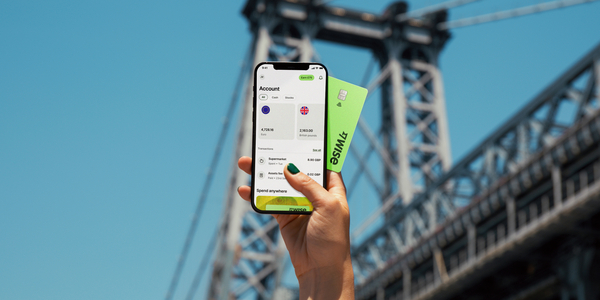
The Wise account is an easy way to hold and exchange 40+ currencies, including MYR, USD, GBP, and more. All you need to do is create a free account to get started.
With Wise, you can exchange currencies at the mid-market rate each time, with low, transparent conversion fees from 0.77% and absolutely no markups. Plus, you can order a linked Wise card for convenient spending without any foreign transaction fees, and up to 2 free ATM withdrawals to the value of 1,000 MYR when you're overseas. You'll even get 8+ local account details to get paid conveniently to your Wise account in MYR and a selection of other major global currencies.
Sending money or making payments abroad? Wise also offers fast, low cost transfers to 140+ countries - you can track your transfer in your account and your recipient will also be notified when a transfer reaches them.
✍️ Sign up for a free account now
Sources:
*Please see terms of use and product availability for your region or visit Wise fees and pricing for the most up to date pricing and fee information.
This publication is provided for general information purposes and does not constitute legal, tax or other professional advice from Wise Payments Limited or its subsidiaries and its affiliates, and it is not intended as a substitute for obtaining advice from a financial advisor or any other professional.
We make no representations, warranties or guarantees, whether expressed or implied, that the content in the publication is accurate, complete or up to date.

Can you open a BSN account online in 2026? Learn about minimum deposits, age requirements, and how to complete your application at a BSN branch.
Learn how Maybank cardless withdrawal works and how to use it step by step. Find out how to withdraw cash without your card quickly and safely.

Thinking of opening a Maybank savings account online? Check out our 2026 guide on how to do so, from the easiest MAE app steps to hidden fees!

Is the Maybank KrisFlyer Platinum actually worth it for 2026? Here's a breakdown of lounge access, miles rate, and how to save on foreign transactions.

Is Ryt Bank's interest really worth it for Malaysians? Compare the benefits and see how using Wise alongside your account can help you avoid hidden fees.

A guide to Maybank PayWave activation. We explain the 2026 security cooling period, contactless limits, and how to use Wise to avoid bank fees abroad.









