
The Complete Guide to Using Wise with DuitNow in Malaysia
Here's a step-by-step guide to using Wise for DuitNow transactions. Find out how to send MYR to a local ID or scan Alipay+ QR codes from the Wise app.


Merchantrade Money¹ offers a prepaid card and multi-currency e-wallet for customers in Malaysia looking to spend easily when they travel, send payments overseas, and more. International e-wallets can be a convenient and low cost way to manage your money - and when they come with a linked debit card they can also make spending and withdrawing cash on your travels a breeze.
But is the Merchantrade Money app the right e-wallet for you? We’ll run through all you need to know including how the Merchantrade card works, how to get started and how to top up your account once you’re up and running in this Merchantrade review. We’ll also introduce an alternative for comparison - the multi-currency Wise Account. Let’s get started.
| Table of contents |
|---|
Merchantrade Asia offers a range of financial services in Malaysia, including remittances, counter based money services, insurance and more². Merchantrade Money is the Merchantrade multi-currency prepaid card and e-wallet account, which you can use to spend and withdraw from ATMs easily.
Merchantrade Asia Sdn Bhd is licensed by the Central Bank of Malaysia as a Money Services Business for remittance and currency exchange services³.
The Merchantrade Money app and card work together to allow you to easily top up your account, and spend in a range of currencies. We’ll dive into the key features of both the card and the app in a moment - first, here’s an outline of your options⁴:
The Merchantrade Money card is a prepaid Visa debit card which is linked to your e-wallet account. Simply top up your account at a Merchantrade branch, via an agent, at Maybank cash deposit machines, or digitally. Then you can use your card to buy things in person and online, to make physical or digital remittances, or to get cash at home and internationally from a Merchantrade branch or an ATM.
You can use your card for spending and withdrawals at any participating Visa merchant or Visa enabled ATM around the world. Merchantrade won’t charge a fee when you spend a currency you hold in your Merchantrade Money account - which means you can spend in 20 currencies with no foreign transaction fees at the point of purchase. Other currencies attract a 1.75% foreign transaction fee and are subject to the currency conversion rate determined by Visa International⁵.
There’s a contactless payment limit of 250 MYR per day⁵, and depending on how you use your card you may also need to pay fees when you transact - we’ll cover the Merchantrade Money fees in a moment.
The standard Merchantrade Money app lets you top up in MYR and hold up to 10,000 MYR in a standard wallet - or 20,000 MYR if you are eligible to upgrade.
Once you have money in your account you can convert it to any of 20 different foreign currencies: MYR, USD, SGD, GBP, AUD, IDR, EUR, THB, YEN, SAR, CNY, TWD. HKD, KRW, INR, PHP, CAD, NZD, AED, CHF, and VND. You’ll find the Merchantrade rate that will apply to currency conversion in the app - it may contain a markup which is a fee added to the mid-market exchange rate, so it’s worth comparing the exchange rate you’re offered against the Google rate just to check.
With your balance you can spend using your linked Merchantrade card, send card to card payments, pay bills, or make remittance payments. Funds don’t expire, but it’s recommended to make a transaction at least every 6 months with your card to help prevent your account from being marked as dormant⁶. If your account becomes dormant you’ll need to reactivate it, including completing the verification process again.
Merchantrade Money can be a helpful tool if you’re planning to travel and want an easy way to hold a few different currencies to cover you while you’re away. However, it’s not the only e-wallet with a linked multi-currency card. Other providers also offer flexible ways to manage your money across borders, and may also have better exchange rates and lower fees.
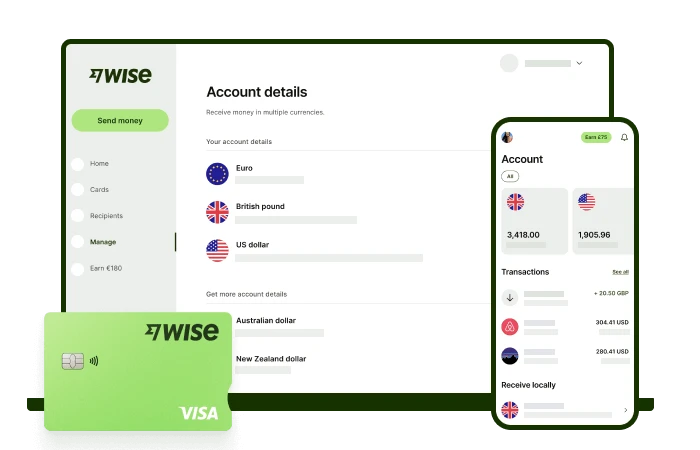
One popular pick for international spending with the mid-market exchange rate is Wise. Wise multi-currency account lets you hold a broad range of currencies with mid-market conversion rates and no ongoing fees.
To help you compare Wise vs Merchantrade to see which may fit your needs best, here’s a head to head look at their key features and fees.
| Features | Merchantrade Money | Wise* |
|---|---|---|
| Eligibility | Malaysian residents only | Available in most countries |
| Joining fee | 10 MYR for card issuance⁷ | Free to open a personal account 13.7 MYR fee to get a linked card |
| Maintenance fee | 10 MYR/year | No fee |
| Account dormancy | Dormant after 12 months of inactivity; transactions every 6 months are recommended | Not applicable |
| Currencies available | 20+ | 40+ |
| Exchange rates | Exchange rates may be set by Merchantrade or Visa, depending on the transaction, and may include a markup | Mid-market rate with no markup |
| ATM withdrawal fees | Up to 2 MYR in Malaysia 10+ MYR internationally | 8.50 MYR per withdrawal |
| Foreign transaction fee | Free to spend currencies you hold 1.75% for currencies you don’t hold in your account | Free to spend currencies you hold Currency conversion from 0.43% if you don’t have the currency required in your account |
| Send payments to | 15+ countries | 80+ countries |
| International payment fees | Varies by country | From 0.43% |
| Receive incoming payments from others | Only from other Merchantrade users (card-to-card) | Local bank details for 10 different currencies to get paid from 30+ countries fee free |
*Please see Terms of Use for your region or visit Wise Fees & Pricing: Only Pay for What You Use for the most up-to-date pricing and fee information.
As you can see, the Wise Account and card lets you hold a significantly broader range of currencies compared to Merchantrade, with no annual fees. Wise Accounts also have no minimum balance, or minimum transaction rate to avoid account dormancy - meaning that you can set up your Wise Account easily, and then just use it to transact whenever you travel, pay foreign currency bills, or shop online with international retailers.
Wise always uses the mid-market exchange rate with no markup for currency conversion - whether you’re making a card purchase, sending a payment or switching between currencies in your Wise Account. There’s no foreign transaction fee to pay - and the card’s neat auto convert option also means you’ll always get the best available conversion option no matter what currency you’re spending.
One other feature that sets Wise apart from Merchantrade is the fact you’ll get local account details to get paid to your Wise Account for free from 30+ countries. If you’re a freelancer working with international clients, or a friend needs to pass you a payment from overseas, this can mean you see more of your money, with lower costs and more flexibility all round. See how much you can save with Wise today!
You can apply for a Merchantrade Money account and card in person or online. If you’re making an in-person application, you’ll need to take along your NRIC, or a passport, a Malaysian Work Permit, or an official photo identification card if you’re a foreigner in Malaysia. You’ll also need a local phone number and address, and proof of employment if you’re employed.
Online, the application process is as follows:
You can top up your Merchantrade Money account in any of the following ways:
The fees for each topup method do vary - but it’s good to know it’s free to top up in a Merchantrade branch, using FPX, with a debit card or with JomPAY. Let’s look at a step by step guide to topping up Merchantrade by FPX⁸:
There are some fees involved with using your Merchantrade app and card - and some limits to the types of transactions you can make. First let’s look at the key fees for using your Merchantrade card and account:
| Service | Merchantrade Money fee⁷ |
|---|---|
| Joining fee | 10 MYR for card issuance |
| Annual fee | 10 MYR |
| Top up fee | Merchantrade branch, FPX, debit card and JomPAY - free Maybank2U and CIMB Clicks - 0.50 MYR Maybank cash deposit machine - 0.50 MYR Participating agents - free |
| Bank transfers | Vary by currency and account type |
| Cash withdrawal | Merchantrade branch - up to 1.50 MYR Participating agents - Up to 1.50 MYR Domestic Visa Plus ATM - up to 2.00 MYR International ATM - from 10 MYR |
| Overseas transaction fees | Free to spend currencies you hold in your wallet 1.75% fee for any other international spending |
Next, a look at some of the limits you should know about when using Merchantrade Money.
As we mentioned above, the overall Merchantrade wallet limit usually starts at 10,000 MYR. However, if you meet the eligibility criteria, you may be able to upgrade to a 20,000 MYR wallet, giving more opportunity to hold, spend and exchange currencies through your account. Here are the standard criteria to upgrade:
Regardless of the wallet size you hold, you’ll also have a handful of other limits to consider:
| Service | Merchantrade minimum limit⁷ | Merchantrade maximum limit⁷ |
|---|---|---|
| Initial top up at Merchantrade branch | 100 MYR | To Merchantrade wallet limit |
| Subsequent top up at Merchantrade branch | 1 MYR | To Merchantrade wallet limit |
| Top up with Maybank2U and CIMB Clicks | Subject to bank minimum | To Merchantrade wallet limit |
| Top up with FPX and JomPAY | 50 MYR | To Merchantrade wallet limit |
| Top up with debit card | 50 MYR | To wallet maximum (5,000 MYR maximum per transaction) |
| Card-to-card transfer | 0.01 MYR | 10,000 MYR daily |
| Contactless payment | No minimum | 250 MYR/day |
| ATM withdrawal | Local: 10 MYR, Overseas: Subject to ATM operators limits | 5,000 MYR maximum per transaction |
Merchantrade Money is part of an established group offering a range of financial services in Malaysia - and the Merchantrade Money card and app can offer a flexible way to hold and spend 20 foreign currencies. However, it’s not the only e-wallet with a linked international card out there, so it’s well worth comparing the Merchantrade rates and fees with a few alternatives to make sure it suits your needs before you leap in.
Take a look at the Wise Account as a good alternative for comparison, with 40+ currencies and exchange which uses the mid-market rate every time.
Start saving money with Wise 🚀
Sources:
*Please see terms of use and product availability for your region or visit Wise fees and pricing for the most up to date pricing and fee information.
This publication is provided for general information purposes and does not constitute legal, tax or other professional advice from Wise Payments Limited or its subsidiaries and its affiliates, and it is not intended as a substitute for obtaining advice from a financial advisor or any other professional.
We make no representations, warranties or guarantees, whether expressed or implied, that the content in the publication is accurate, complete or up to date.

Here's a step-by-step guide to using Wise for DuitNow transactions. Find out how to send MYR to a local ID or scan Alipay+ QR codes from the Wise app.

Looking to maximise your rewards? Explore the best UOB credit cards in Malaysia for travel, dining, cashback, and everyday spending.

Sending money via Bank Islam IBG? This guide has the full timetable, transaction limits, and everything else you need before you hit send.

Looking for the best way to invest in gold in Malaysia? Read our 2026 guide to digital bank accounts, ETFs, physical bars, and hidden trading fees.

Not sure when your IBG transfer will arrive? This guide covers Bank Rakyat's full schedule, cut-off times, fees, and how to send – all in one place.

Find out how to use DuitNow as a foreigner in Malaysia. We cover everything from local bank setups for expats to easy QR scanning for tourists.











