
Best Time to Visit Korea from Singapore: What to do, weather, visas, and more
Wondering when the best time to visit Korea from Australia is? Learn more about weather, seasons and what to do throughout the year in Korea.



Pricing claim based on comparative data for select airports and passes. Live pricing is subject to exchange rate fluctuations.
📱Find out how to get lounge access
South Korea is a popular destination for Singaporeans, whether you're travelling for food, shopping, or K-culture experiences.
If you're wondering whether the Wise card works in South Korea, the answer is yes. You can use it for card payments, ATM withdrawals, and supported QR payments in Korean won (KRW).
Still planning your itinerary? Start with Wise’s guide on travelling to Korea from Singapore, or find out the best time to visit Korea.
| Table of Contents |
|---|


Yes. If you have a Wise account issued in Singapore, you can use it when travelling to South Korea to:
Wise uses the mid-market exchange rate, which is the one you see on Google, with fees shown upfront. This means no hidden markups when you spend or transfer money overseas. With Wise, you can hold and convert 40+ currencies, including SGD and KRW, in one account.
To get started, simply add money to your Wise account and convert to KRW, or let Wise automatically convert at the point of payment.
Yes. Both physical and digital Wise cards are widely accepted anywhere Visa or Mastercard payments are supported.
In practice, your card will work at:
South Korea is highly card-friendly, and most places accept contactless or chip and PIN payments. However, it's still useful to carry a small amount of cash for street markets, smaller vendors, or transport top-ups.1
The Wise card can be used in 40+ currencies and in 150+ countries, making it a convenient option if you're travelling beyond South Korea.
You can use your Wise card in South Korea in a few different ways:
You can also use Wise for QR payments in South Korea where supported.
Supported QR types include Alipay+ QR, which covers KakaoPay QR at participating merchants. Depending on the checkout flow, you may either scan the merchant's QR code in the Wise app, or show your payment QR code for the merchant to scan.
To scan a supported QR code with Wise:
To show your QR code for the merchant to scan:
Not every merchant QR code may work with Wise, so keep your card or cash as backup.
ATMs are widely available across South Korea, especially in convenience stores, subway stations, and banks. Look for ATMs that support international cards, often labelled "Global ATM" or displaying Visa or Mastercard logos.
Do note that ATM operators may charge their own fees per withdrawal, and limits can vary depending on the machine.
With a Singapore-issued Wise card, you can withdraw up to 100 SGD each month for free. After that, low fees apply.
💡 Tip: Always choose to withdraw in KRW and decline any currency conversion offered by the ATM to avoid extra charges.
Wise also lets you create digital cards, which can be useful for travel.
With a digital card, you can:
You can create up to 3 digital cards, each with its own details for added security. If anything looks suspicious, you can replace a digital card instantly without waiting for a new physical card.
Order your Wise card before you travel so you can spend easily as soon as you arrive. You can start using a Wise digital card immediately after ordering, while your physical card is on its way.
You can order a Wise card in Singapore by following these steps:2
Your physical card will be delivered to your registered address, usually within 3 working days. Once you've ordered your physical card, you can create and start using digital cards immediately while you wait for it to arrive.
Before you can spend, you'll need to add money to your Wise balance in the app.
Before heading to South Korea, it's a good idea to prepare your balance. You can:
If you hold a KRW balance, payments will be deducted from it first. Otherwise, Wise will automatically convert from your other balances, with low, transparent conversion fees from 0.26%.
Public transport in South Korea commonly uses T-money, a rechargeable card for buses, subways, and some taxis. It’s worth getting one on arrival if you plan to use public transport often.
For taxis and ride-hailing, card payments are generally accepted, but having some cash on hand for smaller situations is always useful.
Finally, set your card PIN before you go, in case contactless payment is not accepted somewhere.
For longer trips, Wise also has guides on how to go to Jeju from Seoul and how to get from Incheon Airport to Busan.
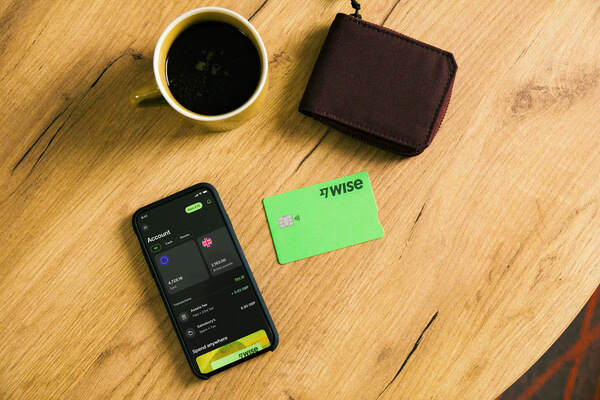
Wise is a convenient option for travel spending in South Korea, allowing you to spend easily with automatic currency conversion and transparent fees.
You can pay in several ways:
With Wise, you can hold and convert 40+ currencies, spend in 150+ countries, and withdraw up to 100 SGD each month for free, before low fees apply.
Sources used:
*Please see terms of use and product availability for your region or visit Wise fees and pricing for the most up to date pricing and fee information.
This publication is provided for general information purposes and does not constitute legal, tax or other professional advice from Wise Payments Limited or its subsidiaries and its affiliates, and it is not intended as a substitute for obtaining advice from a financial advisor or any other professional.
We make no representations, warranties or guarantees, whether expressed or implied, that the content in the publication is accurate, complete or up to date.

Wondering when the best time to visit Korea from Australia is? Learn more about weather, seasons and what to do throughout the year in Korea.

Discover the best ways to travel from Seoul to Jeju Island. Explore options like flights and ferries, with tips on transportation and costs.

Here’s how you can get from Incheon Airport to Busan by plane, KTX or bus. Find out how and how much it costs.
Travelling to Korea from Singapore? We covered the travel requirements, restrictions and Singapore to Korea VTL flight info and more!











