
Guide on PayPal business account in New Zealand
Learn how to open a PayPal Business Account in New Zealand, and explore an in-depth guide to features, fees, and how it works for businesses.


Whether you’re running a florist or a food truck, the right POS system for small business can enhance day-to-day operations. Built-in software automates chores like payment processing and manual tracking, while intuitive UIs reduce training and boost efficiency.
But not every POS system suits every business. In this post, we’re discussing why this tech is important, its key considerations, and some of the best small-business-friendly solutions.
| Table of Contents |
|---|


A Point of sale (POS) system is an integrated software-and-hardware combo designed to process payments, track inventory, and generate reports. As a modern replacement for the old-fashioned cash register, the system accepts various payment types – cash, card, mobile, and online – in one centralised hub.
By automating administrative chores, such as recording sales and calculating GST, a POS can streamline checkouts and reduce human errors. Real-time inventory monitoring helps businesses place better-informed orders, track profitability, and identify best-sellers.
The downside is that POS technology is relatively expensive and requires training to master. Nonetheless, enhanced efficiency makes this investment worthwhile for most small businesses.
When comparing POS systems, consider the hardware, software, integrations, and costs.
Most small businesses choose from one of 4 POS types.
Most POS devices come with a card reader. Optional add-ons include secure cash drawers, receipt printers, and barcode scanners.
Many POS systems integrate with leading accounting and payroll software, such as Xero, QuickBooks, and MYOB. Some POS systems won’t work with some applications, so it’s always worth checking.
Software integration isn’t always a yes-or-no question. Some integrations sync sales, taxes, and payments in real-time, while others only provide weekly updates – the latter may not work for you.
Small kiwi businesses catering to both online and in-person customers may want their POS to sync with their website or third-party services such as Shopify, WooCommerce, or Uber Eats.
POS systems require a substantial financial outlay. Managers can weigh up the costs – upfront and ongoing – against the benefits to determine which system offers the best value.
Tablet and mobile POS systems are significantly cheaper than fixed terminals and self-service kiosks. Cloud-hosted subscriptions have low upfront costs and an ongoing subscription fee, typically ranging from $50 to $300 per month. On-site POS systems require a costly one-off software license but lower ongoing costs.
Card payment processing fees vary by provider and can greatly affect high-volume businesses with slim profit margins. Typical card-present fees range from 1.4% to 2.9%, plus a flat $0.30 per transaction.
You’re up to speed on all things POS. Let’s compare the top options offering full functionality in New Zealand.
Based in windy Wellington, Lazygrid is a home-grown POS company catering to Kiwi SMBs. The brand lets you BYO Apple device to lower costs, or purchase packaged hardware bundles, including small self-service kiosks.
Flexible plans offer various benefits at three different tiers, including staff accounts, reservations, and QR code table ordering. The small-scale POS provider primarily caters to food trucks, restaurants, coffee shops, salons, and spas.1
SalesPoint is another local POS provider, this time from Christchurch.2 The locally-owned brand sells a wide range of reasonably priced hardware for lease or purchase, including touchscreen terminals, receipt printers, barcode scanners, cash drawers, and EFTPOS terminals. Alternatively, businesses can BYOD to lower start-up costs.3
Its software subscription is split into three tiers, with higher levels providing more products, sales, customers, staff, and superior support. Optional add-ons let businesses add extra stores or receive phone support. SalesPoint primarily targets industries such as hospitality, retail, mobile businesses, hairdressing/barbers, and grocery.2
Formerly known as Vend, Lightspeed is a global commerce behemoth with 146k locations processing US$90.7 billion in 2024 alone.~~4~~ The large, well-established platform offers separate retail and hospitality products, each with distinct industry-specific features.5
Lightspeed caters to Kiwis using NZD,5 and supplies a wide selection of hardware to local businesses, from tablets to cash drawers and receipt printers.6 While monthly subscription costs are higher than some local competitors, Lightspeed offers advanced integrations and features that might make it more appealing to high-turnover businesses.
One of the world’s largest e-commerce platforms also processes in-person payments in New Zealand through a robust POS system. The easy-to-use, cloud-based service supports multiple locations and offers high-level security. Small businesses can choose from a range of hardware options and enjoy streamlined integration for many big-name applications.7
Four monthly plans cater to businesses with varying needs, and the POS Pro add-on provides enhanced functionality across inventory management, analytics, omnichannel selling, and more.7 Given its large e-commerce market share, Shopify might appeal to New Zealand businesses trading both in person and online, especially those already using the service.
Once your POS system has handled the customer transaction and the funds are ready for settlement, you need a reliable way to access that revenue.
Wise Business helps solve the logistical hurdle of where that money goes next by providing local NZD account details to receive payouts from your payment processor or e-commerce platform. This allows you to keep more of your hard-earned money by avoiding the high conversion fees and exchange rate markups often charged by traditional banks.
Expanding a business globally opens up exciting opportunities, but also new challenges like receiving payments across borders. Hidden foreign transaction fees and hefty currency conversions involved with international payments can eat into your profits and time.
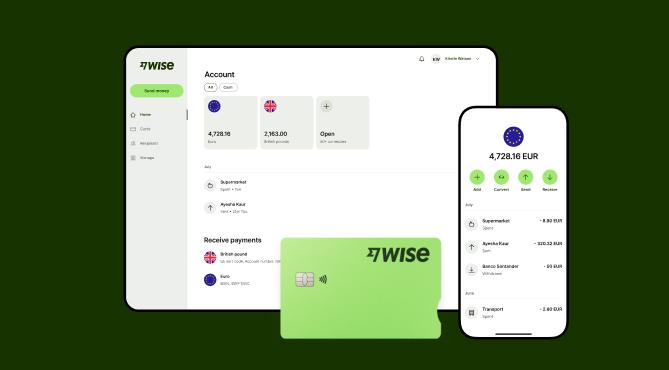
Wise Business serves as a cost-effective solution where you can receive money from around the world at the speed and price of local payments.
Transform the way you receive payments with Wise Business:
Sign up for the Wise Business account! 🚀
This general advice does not take into account your objectives, financial circumstances or needs and you should consider if it is appropriate for you.
1. Can I turn my phone into a POS system?
Yes. You can transform a smartphone into a mobile POS system using an app and NFC technology.
2. What hardware do I need for a POS system?
Common POS systems include a device (tablet, smartphone, or terminal), a card reader, a receipt printer, and a cash drawer. Many providers let you BYOD.
Sources:
*Please see terms of use and product availability for your region or visit Wise fees and pricing for the most up to date pricing and fee information.
This publication is provided for general information purposes and does not constitute legal, tax or other professional advice from Wise Payments Limited or its subsidiaries and its affiliates, and it is not intended as a substitute for obtaining advice from a financial advisor or any other professional.
We make no representations, warranties or guarantees, whether expressed or implied, that the content in the publication is accurate, complete or up to date.

Learn how to open a PayPal Business Account in New Zealand, and explore an in-depth guide to features, fees, and how it works for businesses.

Compare remote payroll software and explore features, pricing, and modern alternatives. Read more here!

Keen to kickstart your business idea the easy way? From obligations to costings, we’re covering how to register as a sole trader in New Zealand.

Learn how recurring payments work for Kiwi SMBs. Learn about fixed vs variable types, direct debit, setup steps, and recurring payments with Wise Business.

Guide to nz telegraphic transfers. learn about swift codes, bank fees, and how to send money overseas. Compare costs and explore alternatives.
Looking for a business debit card in New Zealand? Compare top options, features and fees, plus see how Wise Business excels at international card payments.











