
Pty Ltd: What It means for Australian businesses
Learn what does PTY LTD mean in Australia and how it compares to other business structures. What are theequirements to start a PTY LTD in AU? Find out more!


Amazon is an internationally recognised online marketplace, operating 16 stores across the globe.² If you’re an online retailer or Amazon Australia seller, you may have wondered if it’s possible to expand your customer base and begin selling on Amazon USA.
In this article we’ll explore what there is to know about selling on Amazon USA from Australia, including the requirements, how to set it up and how shipping works. We’ll also look at how a Wise account can support your business as you begin to expand overseas.
| Table of contents |
|---|

Here’s just a few of the benefits to selling your products on Amazon USA.
To sell on Amazon USA as a non-US resident, you need to be a resident of an eligible country, which currently includes Australia.¹
You’ll also need a valid phone number and a credit card that can process international charges.
To start selling on Amazon USA you’ll need to be able to provide the following items.²
To sign up for Amazon USA you need to create a USA seller account through Amazon seller central.¹ This applies to people who already have an Amazon AU account as well as new sellers.
The registration is done online and you’ll be prompted through the process.
Once you’ve signed up for Amazon USA you can create listings and decide how you want to ship your products.
When you’re selling internationally there are two ways to create Amazon listings.
To add a product just to your Amazon US account you’ll need to do the following.³
If you want to add a product to multiple Amazon marketplaces at once, you can use the Build International Listings tool.² This handy tool allows you to quickly add products to multiple marketplaces and synchronises the prices based on your set preferences.
There are two main ways to get your stock from Australia to your Amazon USA customers.
With Fulfilment by Seller, you’re responsible for shipping your product from Australia to your customers international address.² You’ll need to make sure you’re on top of the customs processes so there aren’t any shipping delays and keep your customers informed of accurate shipping times and any additional duties or taxes they might be charged on their order.
The other option is to sign up for the Fulfilment by Amazon Program (FBA). With FBA, you ship your products to an Amazon fulfilment centre and they take care of the packing, shipping, returns and customer support on your behalf.²
Keep in mind there are fees for Amazon FBA. What you pay for Amazon FBA in Australia might not be what you pay for Amazon FBA in America.
When you send products to an Amazon US warehouse they’ll need to be imported into the country. Amazon don’t take responsibility for any import fees, customs duties or other charges associated with this process.²
Before you send your products, you’ll need to go through the process to add inventory on Seller Central and make sure the products are packaged and organised as per the Amazon FBA guidelines.
To actually send the products, Amazon suggests that you use a customs broker or freight forwarder to help you.² They also provide a list of International shipping services you could engage to get your inventory to the fulfilment centre.
Note that Amazon won’t act as the Exporter of record (EOR) or Importer of record (IOR) for your shipment.²
If your stock originates in China you might be able to take advantage of Amazon Global Logistics. This network enables you to ship inventory directly from China to the US via sea or air.³
There’s some variation in the rates and transit times, and you will need to check if you're required to have an Employer Identification Number for US customs.
Here’s a few things to keep in mind when you decide whether or not you’re going to start selling through Amazon USA.
To start selling on Amazon US you will likely need local banking details to receive your USD earnings.
Opening a traditional US bank account from Australia can be difficult, but a Wise Business account helps solve this by providing you with valid US account details.
Expanding a business globally opens up exciting opportunities, but also new challenges like receiving payments across borders. Hidden foreign transaction fees and hefty currency conversions involved with international payments can eat into your profits and time.
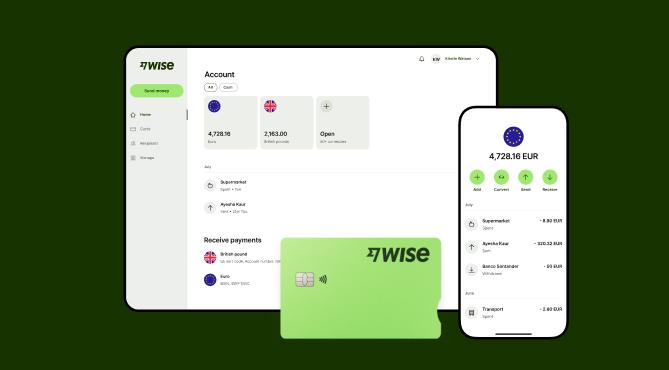
Wise Business serves as a cost-effective solution where you can receive money from around the world at the speed and price of local payments.
Transform the way you receive payments with Wise Business:
Sign up for the Wise Business account! 🚀
This general advice does not take into account your objectives, financial circumstances or needs and you should consider if it is appropriate for you.
Sources:
*Please see terms of use and product availability for your region or visit Wise fees and pricing for the most up to date pricing and fee information.
This publication is provided for general information purposes and does not constitute legal, tax or other professional advice from Wise Payments Limited or its subsidiaries and its affiliates, and it is not intended as a substitute for obtaining advice from a financial advisor or any other professional.
We make no representations, warranties or guarantees, whether expressed or implied, that the content in the publication is accurate, complete or up to date.

Learn what does PTY LTD mean in Australia and how it compares to other business structures. What are theequirements to start a PTY LTD in AU? Find out more!

If you’re on the hunt for a suitable business credit card in Australia, there are several offerings available. A mutual or ‘customer-owned’ bank, Heritage...

If you’re a business owner in Victoria seeking a low-rate business credit card solution, Bank of Melbourne (BOM) may be worth considering. Existing...

If you run a business that deals with international trade, you know the importance of finding a service provider that makes international payments and foreign...
If you’re the owner of a business or run the finances of one, you might be considering business debit cards. These cards are usually connected to the...

Whether you have your own business already, or are looking to start one, there might be a time where you may need to seek out overseas suppliers to fulfil...











