
How to use the Revolut card abroad: Guide for Kiwis
Planning a trip? Learn how to use your Revolut card abroad, including fees, limits to be aware of, and how it compares to the Wise card for travel.



Sharesies¹ is a popular platform for buying and selling stocks, crypto and similar assets, as well as for saving. This Sharesies review covers all you need to know about the service, how it operates and what you can do with it.
We’ll look at how to invest in Sharesies, how to sell shares on Sharesies and the fees that apply when you use the service. We’ll also touch on Wise which is a helpful tool for people converting, sending and receiving foreign currencies for investments, travel and day to day use.
| Table of Contents |
|---|
Sharesies is a wealth technology platform² which allows individuals and business customers to buy, sell and manage investments, as well as offering savings options. The Sharesies app covers investing, KiwiSaver, savings, crypto, and insurance so you can manage many of your financial needs all in one place.
So - how does Sharesies work, and what Sharesies fees apply when you transact? We’ll cover all that in just a moment.
The value of investments can go down as well as up. This guide is for information only and does not constitute advice. Get professional help if you’re new to investing, to help you understand the risks involved and how to make the most of your money.
Sharesies has a broad range of financial products and services for New Zealanders, from insurance to a debit card, savings accounts and Kiwisaver retirement plans. However, the main reason many people turn to Sharesies is for investing.
This guide focuses on Sharesies investment options. We’ve touched on the other services available below - and there’s lots more to learn on the Sharesies website.
For investments, Sharesies offers:
Sharesies Kiwisaver lets you invest for retirement in a range of ways. Options include eight base funds which have varying degrees of risk and anticipated return, self selection investments and personal investment planning tools.
The Sharesies Debit Card³ offers cash back through its Investback program, with varying annual account fees depending on whether you’ve got a Sharesies plan or not. There’s also a 0.5% currency conversion fee when you spend abroad. The debit card only offers holding in NZD at the moment, but multi-currency features are slated to arrive soon.
Sharesies savings options include⁴:
Sharesies also offers car and pet insurance alongside its other financial products, which you can buy and manage from the Sharesies app.
Sharesies is a registered financial services provider⁵, and is generally considered safe to use. Some Sharesies services are offered through partner organisations - US share trades for example⁶. The companies Sharesies works with are also subject to regulatory checks.
We’ll look at how to use Sharesies to buy and sell shares in a moment - but first, it’s important to know the Sharesies fees which apply to different transactions. We’ve detailed the Sharesies investment fees here - there are also fees associated with other services such as Kiwisaver, savings accounts and crypto. Check out the full details on the Sharesies pricing⁷ webpage if you’re interested in these services.
| Service | Sharesies fee |
| Transaction fees |
|
| Currency exchange fee |
|
| Top up fee |
|
| Fast withdrawal fee |
|
| Account close fee |
|
| Other fees | Some other fees can apply which are not paid to Sharesies, including: management fee, managed fund transaction fee, depositary fee - check details before you transact |
*Details correct at time of research - 10th March 2026
Let’s walk through how to invest in Sharesies to illustrate how to use the app. Before you can buy or sell assets with Sharesies you’ll need to register an account and get verified. Verification is normally done with a valid NZ driver license or a valid NZ passport for ID⁸, and a proof of address⁹.
If you don’t have a NZ passport or driver license there are a few other options but you’re likely to need your documents (such as a foreign passport) to be certified by an eligible person to apply.
Once you’re all set up with Sharesies you can start to trade. The exact process you follow may vary a little depending on the type of assets you want to buy, but there’s a helpful resource center on the Sharesies website which gives more information. We’ve summarised the core processes below.
You can buy shares in New Zealand, Australia or the US using Sharesies. You’ll need to have a balance in your Sharesies wallet before you transact. Top up your wallet online or in the app from your bank or using a card, in NZD¹⁰.
If you’re thinking of buying Australian or US stocks you may then need to switch your NZD to USD or AUD¹¹. You must have the correct currency to buy the assets you’re interested in before you buy, or Sharesies may be able to convert your NZD balance for you at the point of purchase instead if you like. This will involve paying a currency conversion fee of 0.5% to Sharesies.
Once you have the right balance in your Sharesies account you can arrange your purchase.
Here’s how to buy shares on Sharesies¹²:
- Log in to your Sharesies account and select Explore
- Find the investment you want to buy using the filters or the ‘Search all investments’ option
- Select the investment you’d like to buy and tap Buy
- Choose the type of order you’d like to place, check everything over and select Buy
When it's time to sell assets you hold you can do so in the Sharesies app or desktop site, and then withdraw your proceeds when you’re ready.
Here’s how to sell shares with Sharesies¹³:
- Log into Sharesies and find the investment you want to sell in your Portfolio
- Select Sell and then the type of sale, such as a market order or limit order
- Enter the number of shares or units you want to sell
- Select Review to check everything over and then Sell to place your order
Once your shares have sold your proceeds are deposited into your Sharesies account. You can then withdraw your money if you want to. Withdrawals can be made in NZD only, and are deposited to your linked New Zealand bank account.
Here’s how to initiate a withdrawal from Sharesies¹⁴:
- Log into Sharesies and go to Wallet, then Withdraw
- Enter how much you’d like to withdraw
- Enter your account information to confirm where you want the withdrawal to be deposited, or choose a bank account from those you’ve linked to your account
- Your money is usually deposited within 1 - 2 days
Bear in mind that if your Sharesies account holds AUD or USD, you’ll need to convert it to NZD to withdraw to your linked bank. Sharesies has a 0.5% fee for currency conversion. If you’re looking for better ways to manage your currency conversions and overseas payments, you might like Wise. We’ll look at how Wise can help people living an international lifestyle, or investing abroad, a little later.
Sharesies has a broad range of investment and savings options for New Zealand residents and international investors. You can buy and sell assets with your phone or laptop, which is convenient, and access markets in New Zealand, Australia and the US.
One major downside of Sharesies is that currency conversion comes with additional fees when buying or selling foreign assets. If you want to buy US shares for example, you’ll have to pay a fee to convert your NZD to USD to invest - and then another fee when you withdraw, to switch your USD back to NZD to deposit to your bank.
Before using Sharesies compare all your options, and make sure you understand the costs as well as the risks involved.
The Wise account is an easy way to save up to 4x when you send, spend, and withdraw money internationally. Hold and manage 40+ currencies, including NZD, USD, EUR, and more. All you need to do is sign up for a free account to get started, there's no monthly fees either.
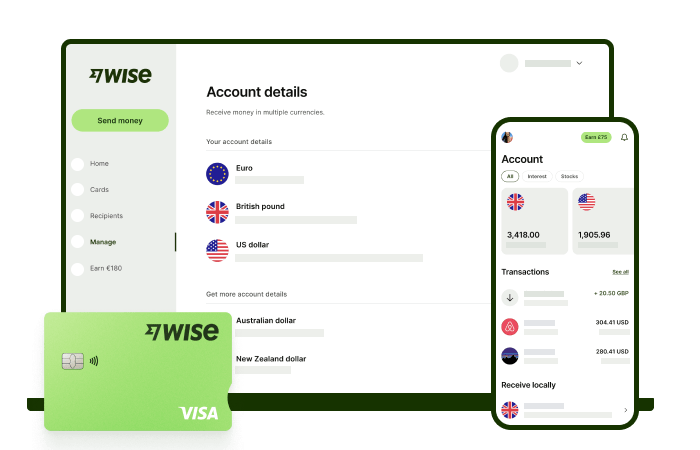
You can exchange currencies at the mid-market rate on every conversion — basically the rate you see on Google. And with zero foreign transaction fees, and low, transparent pricing, Wise usually gives you the best value for your money.
You'll get 8+ local account details in NZD and a selection of other global currencies to get paid conveniently to your Wise account. And when it's time to send money abroad, enjoy fast, low-cost transfers to 140+ countries. Plus, you can get a linked Wise debit card for spending internationally at the same great mid-market rate.
When it comes to managing money globally, the Wise account is a handy tool that makes it easier and simpler.
This general advice does not take into account your objectives, financial circumstances or needs and you should consider if it is appropriate for you. Savings claim based on our rates vs. selected New Zealand banks and other similar providers in Jan 2026. To learn more please visit https://payout-surge.live/nz/compare%3C/a%3E%3C/p%3E
Please see Terms of Use and product availability for your region or visit Wise Fees & Pricing for the most up to date pricing and fee information.
Sources:
*Please see terms of use and product availability for your region or visit Wise fees and pricing for the most up to date pricing and fee information.
This publication is provided for general information purposes and does not constitute legal, tax or other professional advice from Wise Payments Limited or its subsidiaries and its affiliates, and it is not intended as a substitute for obtaining advice from a financial advisor or any other professional.
We make no representations, warranties or guarantees, whether expressed or implied, that the content in the publication is accurate, complete or up to date.
Planning a trip? Learn how to use your Revolut card abroad, including fees, limits to be aware of, and how it compares to the Wise card for travel.

Follow the step-by-step instructions to order your Wise Visa FIFA World Cup 2026™ digital card, thanks to Visa

Our Kernel Wealth review breaks down the platform's features, fees, and how it works. Learn how to invest with Kernel Wealth and decide if it's right for you.

Looking for the best investment platform in NZ? Compare fees, features, and more for Sharesies, Tiger Brokers, and more to find your ideal investment platform.

Our Tiger Brokers review breaks down the platform's features, fees, and how it works. Determine if Tiger Brokers is right for you.

Discover the best credit cards for airport lounge access in New Zealand and compare their latest features and fees.











