
Guide on PayPal business account in New Zealand
Learn how to open a PayPal Business Account in New Zealand, and explore an in-depth guide to features, fees, and how it works for businesses.



Building a business can be a slog. But with the right website builder, designing a site is relatively stress-free, even for cash-strapped entrepreneurs with limited tech expertise.
Every website builder is built differently. To help you find the right fit, we’re covering the top 7 options for Kiwis.
| Table of contents |
|---|
Sign up for the Wise Business account! 🚀
With the domination of social media, does a small business really need a website in 2025?
You bet. Savvy SMBs will launch a website, together with multiple social media accounts and a Google Business Profile, as part of a broad online marketing strategy.
A well-designed website boosts credibility, conveys professionalism, establishes trust, and showcases brand identity to differentiate your business in a saturated market. It’s also a centralised information hub covering products, pricing, service areas, contact details, customer support, and policies.
With some Search Engine Optimisation (SEO) expertise, your website can lure qualified leads. Compelling copy could convert those readers into buyers, while in-built e-commerce tools can secure an instant sale. A website can also help Kiwis with bold global ambitions trade beyond our borders.
Plus, with the right builder, launching a website is fast, easy, and cheap – it’d be silly not to.
Not every website builder suits every business. Consider the following when comparing options.
Free plans often include unsightly on-page ads and non-customisable URLs, making paid subscriptions a superior choice. Check whether your plan provides domain registration and hosting.
The best website builders for small businesses in New Zealand offer simple, drag-and-drop interfaces for users with zero coding skills. A wide range of free or low-cost templates makes life even easier.
Will you make sales or schedule consultations? Many builders have an appointment booking tool, and eCommerce features like secure payment portals, product galleries, inventory management systems, and shipping label printing.
In-built SEO tools can fine-tune your content to rank better on SERPs and drive more traffic to your website. Integration capabilities also play a role in connecting with third-party tools that can enhance the web building experience.
Here are some of our favourite platforms for small Kiwi businesses with varying needs.
Note: NZD prices often aren’t provided, so we’ve used AUD instead. Most website builders offer discounts for annual upfront payments.
One of the biggest names in the industry, Wix1 has been helping small businesses launch pro-level websites since 2006. A simple, user-friendly interface, drag-and-drop webpage editor, and a wide selection of 900+ templates have seen the brand become a mainstay.
Recent add-ons, such as AI-powered design automations, data analytics, and marketing integrations, appeal to advanced users with complex needs. On the whole, though, its widespread popularity stems from non-technically-minded entrepreneurs who want something simple that works.
All plans include a domain, web hosting, and customer support. Although a tad pricier than some competitors, the Light tier works well for sole traders and small-time entrepreneurs. Higher tiers offer more storage, e-commerce add-ons, payment portals, and advanced web developer tools.
Best for:
Features:
Pricing:
Another long-standing classic, WordPress2 is the world’s leading Content Management System (CMS) and blogging platform, powering a staggering 43% of the web.3
As such, it’s popular among businesses focusing on content marketing. Users can easily upload, edit, and publish blogs directly onto WordPress, saving time for content managers and writers.
A laundry list of world-famous brands use the service, including Meta, Slack, Samsung, News Corp, and Conde Nast. The solution also suits small-time bloggers and content marketers. All plans include WordPress hosting.
On the downside, the learning curve is steeper than other web builders.
Best for:
Features:
Pricing:
Squarespace4 is the go-to website builder for Kiwis keen on design. Whether you’re a photographer, illustrator, graphic designer, or wedding planner, customisable Squarespace templates will showcase your eye-catching creations in style.
Even the most basic plan comes with one year of free domain registration. To incorporate web analytics, payment portals, merchandising and shipping, you’ll need to update to a higher tier. Every Squarespace tier includes fully-managed cloud hosting.
Squarespace is rather pricey, and the UI requires patience to learn, but an extensive template library and how-to guides speed things along. The platform offers 24/7 support should you get stuck.
Best for:
Features:
Pricing:
Forming part of the Square eCommerce suite, Weebly5 is an easy-to-use website builder for low-budget entrepreneurs.
Weebly offers a viable free plan featuring SEO tools, inventory management, a shopping cart, and in-store pick-ups. You won’t get a custom domain, however, which is a dealbreaker for many small businesses.
Upgrading to an affordable paid tier lets you connect a custom domain and add various marketing and eCommerce perks. Site stats, unlimited storage, and payment options become available with higher plans.
You must subscribe to the Professional tier to remove ads from your site. So while Weebly is superb value, there are some caveats to consider.
Best for:
Features:
Pricing:
Serious entrepreneurs may wish to invest in a more comprehensive solution, such as Shopify0. As the industry-leading e-Commerce product, Shopify helps brands convert sales and grow with customer-friendly payment and shipping solutions.
Shopify’s world-best checkout system converts an average of 15% more than other e-commerce platforms, and the Shopify POS seamlessly links online and in-person sales. Users get access to multiple sales channels, including Google and social media, as well as in-depth analytics and commerce apps.
While significantly pricier than Weebly, Shopify can offer a solid ROI when used properly.
Best for:
Features:
Pricing:
Keen to keep things local? Dazzly7 is a 100% New Zealand-owned and operated website builder achieving dazzling results. The highly flexible service doesn’t require a credit card or fixed terms, and its basic starter plan offers good value for budget-conscious bootstrappers.
Upgrade to the next tier for website consultations, SEO support, and a free domain. The Dazzly team also offer a plethora of paid add-ons, including content marketing, email addresses, logo design, and pro website builds.
Best for:
Features:
Pricing:
Know some basic HTML or CSS? A more advanced website builder like Webflow8 might see you achieve better results. A hit among seasoned IT professionals, this advanced option offers a wide array of design features that surpass basic drag-and-drop builders.
Once you’ve built a brilliant site, a range of paid add-on plans help you analyse, localise, and optimise.
Separate Site and Workspace plans require individual sign-ups, which can add to the cost and complexity. But for skilled IT professionals seeking extra functionality, Webflow delivers stellar results.
Best for:
Features:
Pricing:
Once your professional new website is ready to attract customers, the next step is managing your business finances, especially if you have global ambitions. For Kiwi businesses selling to customers or paying for services in different currencies, a Wise Business account can help streamline operations.
Wise Business allows you to receive payments from e-commerce platforms like Shopify and Stripe with local account details for over 8+ major currencies, including AUD and USD. This means you can get paid like a local and avoid hefty conversion fees. You can then hold funds in various currencies or use your Wise Business debit card to pay for international business expenses, like your website subscription, always at the mid-market exchange rate.
Expanding a business globally opens up exciting opportunities, but also new challenges like receiving payments across borders. Hidden foreign transaction fees and hefty currency conversions involved with international payments can eat into your profits and time.
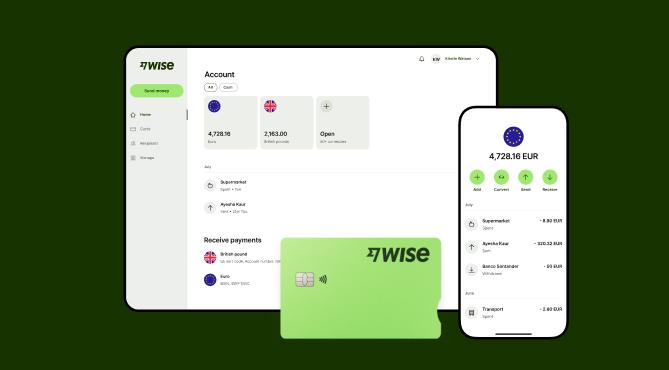
Wise Business serves as a cost-effective solution where you can receive money from around the world at the speed and price of local payments.
Transform the way you receive payments with Wise Business:
Sign up for the Wise Business account! 🚀
This general advice does not take into account your objectives, financial circumstances or needs and you should consider if it is appropriate for you.
1. How much is it to build a website for a small business?
Depending on the size, features, and content, a professionally-made website can cost between $2,000 and $50,000 in New Zealand. The DIY approach using a website builder is cheaper but requires time investment.
2. Can AI help build a website?
Some website builders include AI-powered tools to speed up the design process.
3. Can I build a website for free?
Yes, some website builders offer basic free plans. However, you won’t get a customisable web domain and will likely have advertising on your site.
4. Are website builders worth it?
A DIY design with a website builder won’t match the polished aesthetic of a professionally-made webpage. But it can achieve respectable results for a fraction of the cost.
Sources:
*Please see terms of use and product availability for your region or visit Wise fees and pricing for the most up to date pricing and fee information.
This publication is provided for general information purposes and does not constitute legal, tax or other professional advice from Wise Payments Limited or its subsidiaries and its affiliates, and it is not intended as a substitute for obtaining advice from a financial advisor or any other professional.
We make no representations, warranties or guarantees, whether expressed or implied, that the content in the publication is accurate, complete or up to date.

Learn how to open a PayPal Business Account in New Zealand, and explore an in-depth guide to features, fees, and how it works for businesses.

Compare remote payroll software and explore features, pricing, and modern alternatives. Read more here!

Keen to kickstart your business idea the easy way? From obligations to costings, we’re covering how to register as a sole trader in New Zealand.

Learn how recurring payments work for Kiwi SMBs. Learn about fixed vs variable types, direct debit, setup steps, and recurring payments with Wise Business.

Guide to nz telegraphic transfers. learn about swift codes, bank fees, and how to send money overseas. Compare costs and explore alternatives.

Looking for a business debit card in New Zealand? Compare top options, features and fees, plus see how Wise Business excels at international card payments.











