
How to order the Wise Visa FIFA World Cup 2026™ card, thanks to Visa
Follow the step-by-step instructions to order your Wise Visa FIFA World Cup 2026™ digital card, thanks to Visa With the World Cup starting soon, you may be...




Pricing claim based on comparative data for select airports and passes. Live pricing is subject to exchange rate fluctuations.
📱Find out how to get lounge access
Need to send birthday money to a relative in Europe, pay for a US purchase, or settle an invoice with an overseas freelancer? Whatever the reason, you need a quick, secure, and fair way to move your money across borders.
If you’re a customer of ANZ Bank New Zealand, you can send and receive international payments directly through your account. In this guide, we’ll break down the fees, how to make a transfer, and how long it actually takes. We'll also introduce to you Wise that can help you save on international transfers with it's low, transparent fees and mid-market exchange rates.

Yes, if you are an ANZ New Zealand customer with an active transaction or savings account, you can send and receive international payments. ANZ supports transfers in over 30 currencies to more than 250 destinations worldwide.
Eligibility:
Here’s the fees you should take note of for your international transfer with ANZ
| Service Type | Fee (NZD) |
|---|---|
| ANZ Internet Banking | $0 |
| ANZ goMoney App | $0 |
| Phone Banking | $15 |
| In-Branch | $15 |
| Incoming International Transfer | $15 (waived if under $300 NZD)¹ |
OUR Fee:
In addition to the charges above, an OUR Fee may apply to your payment. When you send money via the SWIFT network, it often travels through intermediary or correspondent banks before reaching its final destination. These banks usually deduct a fee from the total amount. To ensure your recipient gets the exact amount you sent, ANZ offers an OUR Fee option.
The OUR Fee is a process fee charged by ANZ. In exchange, ANZ covers the correspondent bank fees so they aren't deducted from your transfer amount.¹ An OUR Fee applies when you make an international money transfer in:
You won't be charged this fee if you use goMoney or Internet Banking to send:¹
When transferring money overseas, the "sending fee" is only half the story. You also need to look closely at the exchange rate, especially when currency conversion is involved.
ANZ uses its own exchange rates, which are updated throughout the day. While these rates are published on their website, ANZ also explicitly states on their calculator that these exchange rates include a margin. This margin is essentially a hidden fee where the bank adds a percentage to the conversion, meaning the rate you get is often more expensive than the one you see on Google.
To see the real cost of your transfer, it’s a good idea to compare ANZ’s rate against the mid-market rate. This is the exchange rate banks use to trade with each other. Wise does things a little differently, Wise always uses the mid-market rate for every transaction, with no hidden markups. This ensures that more of your money actually reaches your recipient.
Here’s the daily international limits for ANZ transfers.
| Transfer Method | Daily Limit (NZD) |
|---|---|
| ANZ goMoney app | $50,000 |
| ANZ Internet Banking | $50,000 |
| Phone Banking | $100,000 |
| In-branch | No set limit (subject to available funds and ID) |
One of the quickest and easiest ways to send money overseas is to use ANZ’s internet banking service. You can also make international money transfers (known in banking terms as an IMT) using the ANZ GoMoney app, by phone or in an ANZ branch.
Follow these steps to set up an IMT in ANZ internet banking:
You can also make international payments through the goMoney mobile app. Follow these steps:
ANZ recommends using digital channels, but you can also process payments manually with a fee:
To make an international transfer with ANZ NZ, you’ll typically need:
- BIC/SWIFT code of the recipient.
- IBAN or account number of the recipient
- Recipient’s full name and account name if it’s different
- Recipient’s home address
- Recipient bank’s address
When you send an international money transfer with ANZ, your funds are typically on a journey of 2 to 4 business days before they reach the recipient's account.
Daily Cut-off Times
To get your money moving on the same day, you need to hit ANZ's processing windows. If you miss these, your transfer won't start until the next business day.
To receive money from overseas into your ANZ New Zealand account, you’ll need to provide the sender with your full name, physical address, and your 16-digit account number. They will also need the ANZ SWIFT/BIC code. Just keep in mind that since New Zealand doesn't use IBANs, you should tell the sender to use your standard account number; if their bank insists on a "Routing Number" or "BSB," you can provide the first six digits of your account.
Check out a complete guide on how to receive money from overseas with ANZ.
Transferring money internationally with ANZ can be quite simple, especially if you’re an existing account holder. Their digital platforms allow you to send funds with ease and convenience. However, if you are more budget-conscious, it is worth comparing the total cost of your transfer with providers like Wise, who offer the mid-market exchange rate and transparent, low fees.
Wise is an easy way to save up to 6x when sending money overseas. You can make extra secure transfers to 140+ countries, which are easy to set up with no physical paperwork and completed usually in seconds.
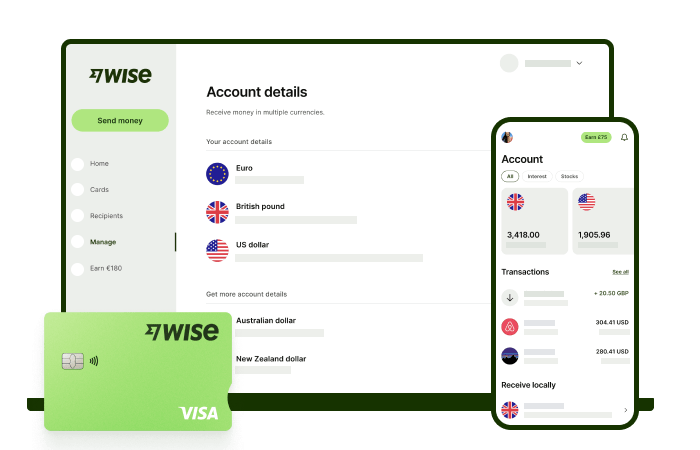
With low, transparent pricing and the mid-market exchange rate for all your currency conversions for your foreign transfers, you'll usually get the best value for your money. Wise lets you see exactly what you're paying for a transfer, and what the recipient will get, with no hidden fees.
For managing foreign currencies even easier, create a free Wise account, and you'll be able to manage and convert your money in NZD and 40+ other currencies. Plus, you'll get local account details in 8+ currencies, making it easy to receive money from abroad whenever you need. You'll be able to track your transfers all in one place.
When it comes to international transfers, Wise makes things easier and cheaper.
This general advice does not take into account your objectives, financial circumstances or needs and you should consider if it is appropriate for you. Savings claim based on our rates vs. selected New Zealand banks and other similar providers in Jan 2025. To learn more please visit https://payout-surge.live/nz/compare%3C/a%3E%3C/p%3E
Please see Terms of Use and product availability for your region or visit Wise Fees & Pricing for the most up to date pricing and fee information.
Sources:
*Please see terms of use and product availability for your region or visit Wise fees and pricing for the most up to date pricing and fee information.
This publication is provided for general information purposes and does not constitute legal, tax or other professional advice from Wise Payments Limited or its subsidiaries and its affiliates, and it is not intended as a substitute for obtaining advice from a financial advisor or any other professional.
We make no representations, warranties or guarantees, whether expressed or implied, that the content in the publication is accurate, complete or up to date.

Follow the step-by-step instructions to order your Wise Visa FIFA World Cup 2026™ digital card, thanks to Visa With the World Cup starting soon, you may be...

Our Kernel Wealth review breaks down the platform's features, fees, and how it works. Learn how to invest with Kernel Wealth and decide if it's right for you.

Looking for the best investment platform in NZ? Compare fees, features, and more for Sharesies, Tiger Brokers, and more to find your ideal investment platform.

Our Sharesies review breaks down the platform's features and fees. Learn how to buy and sell shares efficiently and find out if Sharesies is the right for you.
Our Tiger Brokers review breaks down the platform's features, fees, and how it works. Determine if Tiger Brokers is right for you.

Moving abroad from New Zealand? Find out if you can keep your bank account open and how to manage your money away from home.











