
Best Credit Card for Travel Insurance in India: Features and Fees
Looking for a credit card to cover any emergencies abroad? We compare the best Indian credit cards for travel insurance.



The Wise Travel card lets you hold 40+ currencies and spend at the interbank exchange rate with no forex markups or hidden fees - now available to order for free (Limited time offer, while stocks last).
Order your free Wise Travel card 💳
PayPal in India offers ways to shop online as a consumer, and receive payments if you are a business.
But if you are an individual that wants to receive money in India, transfer money abroad for cheap, or run a business, pay colleagues or more, PayPal in India can feel limiting.
If you are not using your PayPal account enough or found a better option out there, it may be time to close your PayPal account. But how do you do that? Let’s break down how to delete your PayPal account in India.
| Wise lets you receive money directly to your Indian local bank account with the mid-market exchange rate and just one low transfer fee 💸 |
|---|
Open your free Wise account now
So you have decided to close your PayPal India account. Let’s make sure you have taken all the steps to prepare your account to be closed. Here is what to do¹:
Check to make sure you have paid any outstanding or pending payments on your account.
If you have any remaining money in your PayPal wallet, be sure to either use it up or withdraw it to your bank account.
You can find the “Withdraw money” link under Payment Methods
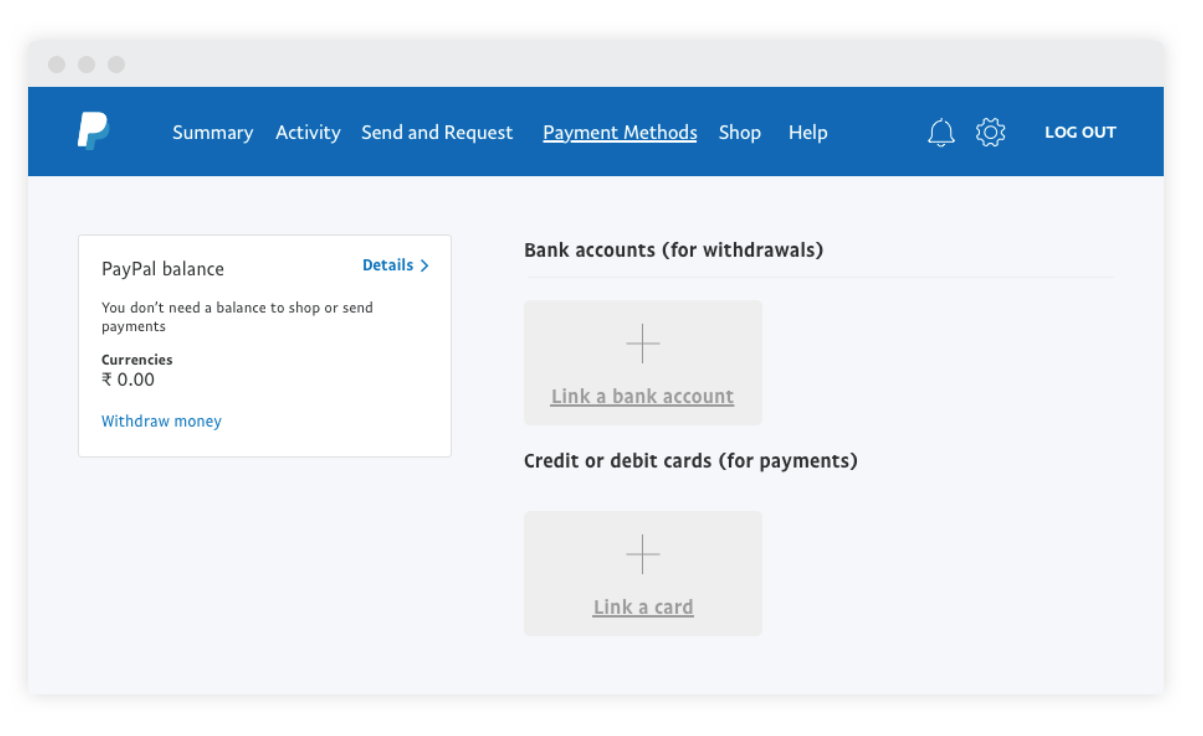
Remove your bank information and card details from your PayPal account.
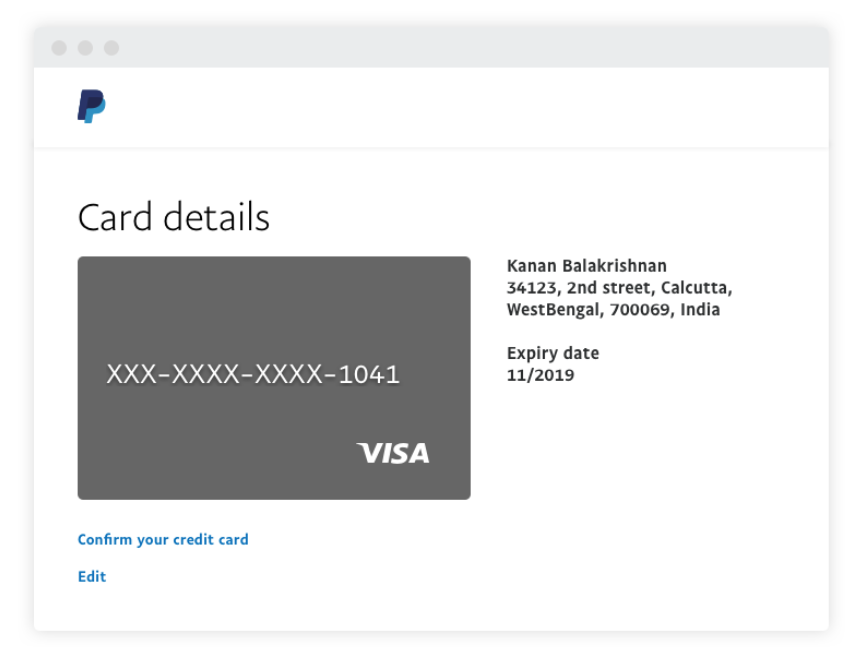
You can remove your card details by going to Payment Methods and then clicking on the card you want to remove. Then click “Edit” under the card’s information, and then “Remove Card”²
If you have faced a difficulty or issue with PayPal India and before you close your account, check with the PayPal customer service to see if they can help you.
PayPal customer service may be able to solve any problems you are facing with your account or rectify what is needed. You can contact them through the help page or through the Resolution Centre for any specific issue.
| 💡TIP: You might want to download a copy of your transaction history on PayPal for your records |
|---|
|
First, be sure that you want to close your account. While you can always open a brand new one later, you will not be able to reopen the same account again.
Second, you can only close your account through the PayPal website, not through the app.
Lastly, PayPal makes it fairly easy to close your account. You just have to go to Settings on your Dashboard and click on Account Options.
Next, click on Close Your Account. You will be guided through the steps to close your account, which may also include verification that you are the owner of the account. It is as easy as that.⁴
If you are a freelancer, business or just an individual in India who needs to send and receive money globally, you have other options for PayPal alternatives that may be cheaper and faster. Let’s take a quick look:
You can also use the Wise compare tool to know and compare some popular options to send money to India.
PayPal business accounts let you get payments from abroad, but it may not be the cheapest way to do international transactions. With one transparent fee and an exchange rate that is the same one that you see on Google, Wise can save you money on every transaction.
Wise offers Indian businesses and freelancers with account details in 8 different currencies to receive payments from abroad. Your clients pay you with a local transfer in their currency, and you receive rupees in your INR bank account — with eFIRC for every transfer. That is truly business without borders.
Get started with a Wise Business Account 🚀
*Please see terms of use and product availability for your region or visit Wise fees and pricing for the most up to date pricing and fee information.
This publication is provided for general information purposes and does not constitute legal, tax or other professional advice from Wise Payments Limited or its subsidiaries and its affiliates, and it is not intended as a substitute for obtaining advice from a financial advisor or any other professional.
We make no representations, warranties or guarantees, whether expressed or implied, that the content in the publication is accurate, complete or up to date.

Looking for a credit card to cover any emergencies abroad? We compare the best Indian credit cards for travel insurance.
Explore benefits, fees, rewards and forex charges. Learn if it’s good for travel and everyday spending.
Learn forex card charges in India, including markup fees, ATM costs, and hidden charges. Compare bank fees and avoid extra costs when spending abroad.
Explore benefits, fees, forex charges and pros and cons. Learn if this metal credit card is good for everyday and international use.

Planning an overseas trip? Compare the best forex cards in India with international lounge access.

We compare the best credit cards in India for frequent flyers, from co-branded airline cards to flexible reward programs like Axis Atlas and Amex.











