Snap it. Send it.
Got an invoice to pay? A screenshot of someone's bank details? A QR code? Scan it, photograph it, or upload it — Wise reads the details and sets up the transfer


If you’ve ever paid a utility bill, a tax invoice, or a local business in Estonia, you’ve probably noticed a string of numbers on your bill called a Viitenumber.
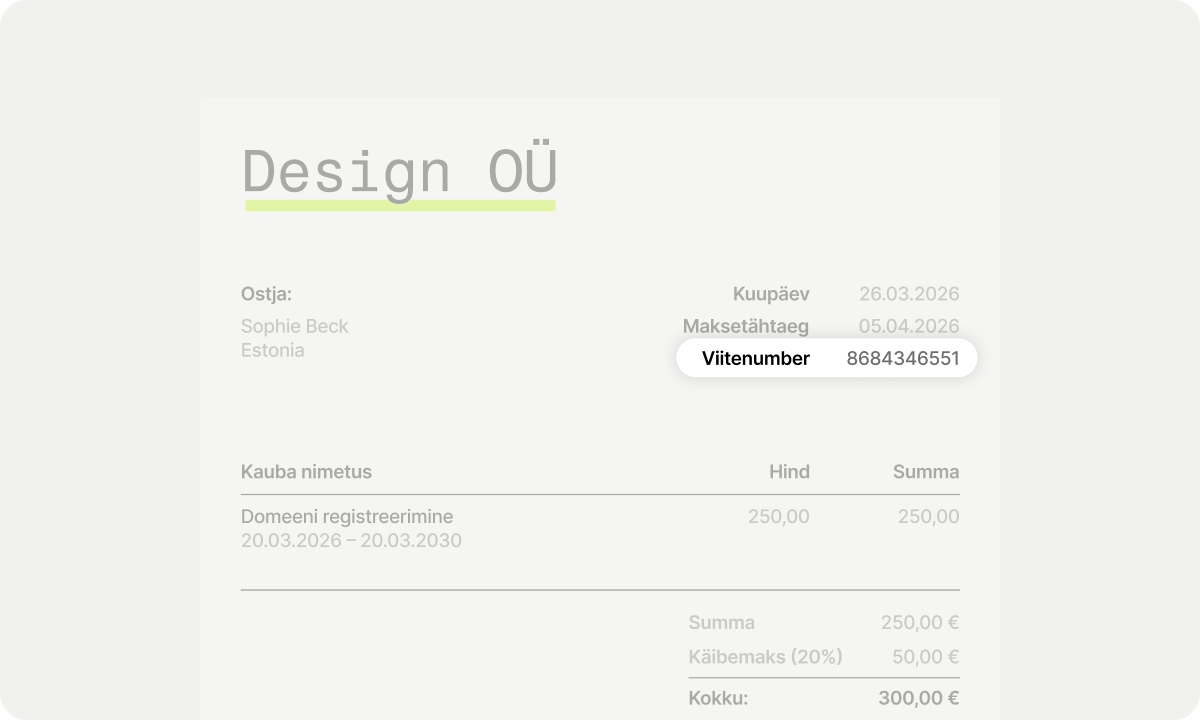
Until now, you might have had to copy and paste this into the optional reference field of your Wise transfer and hope the receiver spotted it. Not anymore.
We’ve added a dedicated Reference number (Viitenumber) field to Wise, to make your transfers to Estonia faster, easier, and perfectly matched - every time.
Viitenumber literally translates to "reference number". It's a unique numeric code used by Estonian businesses and banks to automatically match your payment to your specific account or invoice.
When you use an official Viitenumber, your money gets sorted instantly by the receiver's accounting software. That means no more delayed payments, no more "we haven't received your funds" emails, and no more manual checks.
Next time you’re setting up a transfer to an Estonian (EE) business bank account, just look out for the new Viitenumber field right under the payment details.
Type or paste the number exactly as it appears on your bill. We’ll even run a quick check on the math (Estonian reference numbers have a special built-in formula) to make sure you haven't accidentally made a typo.
Want to skip the manual entry altogether? Our AI-powered features can do the heavy lifting for you, and yes - they are fully trained to spot and extract your Viitenumber.
There are two fast ways to let our system set up your transfer automatically:
1. Upload a screenshot or file
If you have the invoice saved on your phone or computer, you can use our Upload screenshot (for personal accounts) or Upload invoice (for businesses) feature.
2. Forward your bill straight to Wise via email
Did you just receive an invoice in your inbox? You don't even need to open the Wise app to start the payment.
Both of these features save you time, prevent typos, and ensure your money gets exactly where it needs to go without the hassle of manual data entry.
Try them out on your next transfer to Estonia!


*Please see terms of use and product availability for your region or visit Wise fees and pricing for the most up to date pricing and fee information.
This publication is provided for general information purposes and does not constitute legal, tax or other professional advice from Wise Payments Limited or its subsidiaries and its affiliates, and it is not intended as a substitute for obtaining advice from a financial advisor or any other professional.
We make no representations, warranties or guarantees, whether expressed or implied, that the content in the publication is accurate, complete or up to date.

Got an invoice to pay? A screenshot of someone's bank details? A QR code? Scan it, photograph it, or upload it — Wise reads the details and sets up the transfer

We're thrilled to introduce a powerful new feature designed to save you time and eliminate the frustration of manual data entry when sending money. Now,...

The new Wise Card is here! 🇧🇷

We have great news for our customers in Brazil! You can now set up your own Pix key directly in the Wise app
Welcome to the Wise Partner Program! In this guide, you will find all the information you need to get started, optimize and succeed as a Wise partner. Simply...
From time to time, you might make a purchase with your Wise card and run into an issue — maybe something you bought didn’t arrive, wasn’t as described, or you...









